Stop running closings out of your inbox.
Every transaction gets its own private room: the people and the role each plays, the documents that deal type actually needs, the signatures, the deadlines, and a record of everything that happened. Open a room and you already know what is missing and what is due — without scrolling a thread.
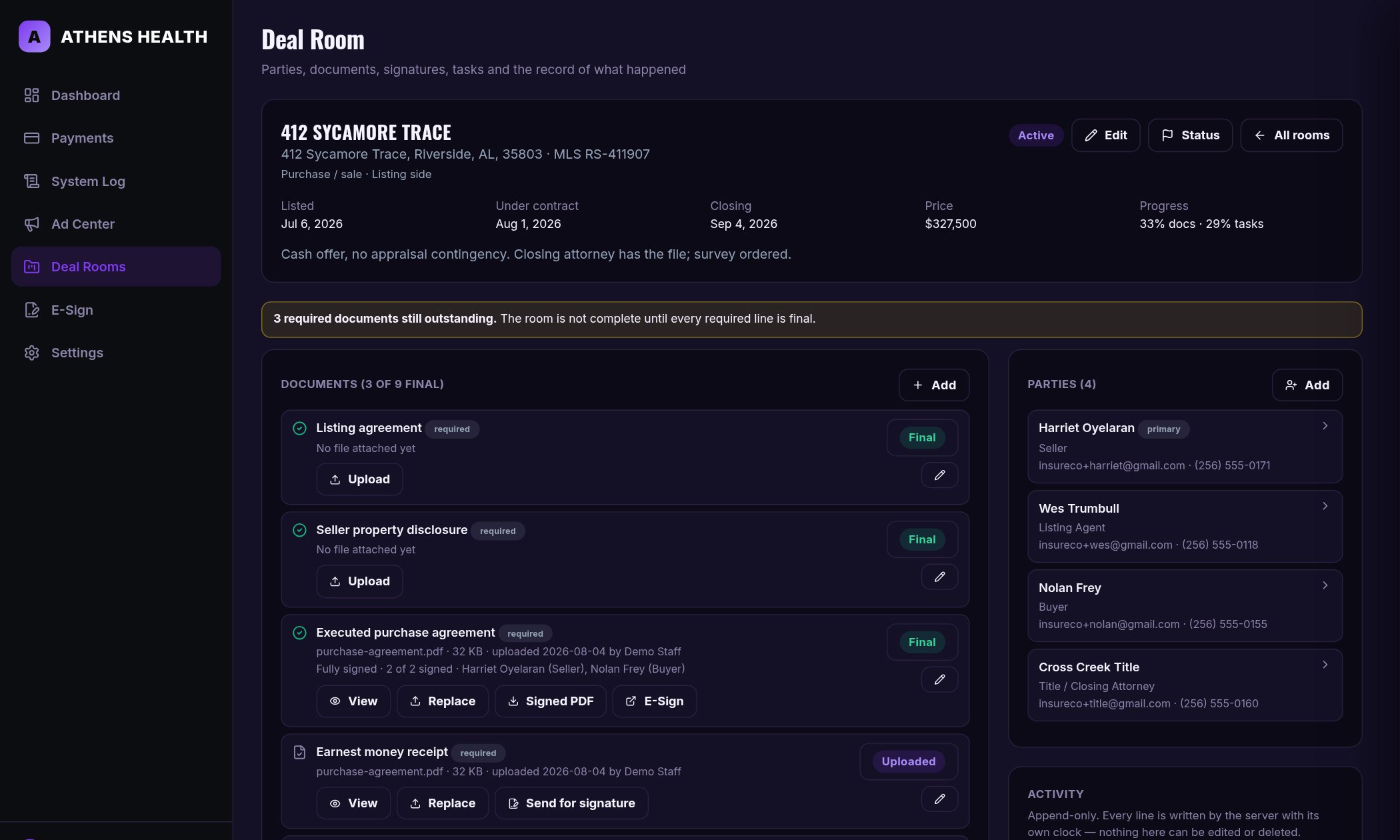
Deals do not fall apart at the closing table. They fall apart in the week before it.
A disclosure nobody countersigned. An inspection deadline everybody assumed was handled. A contract that exists in four versions across three inboxes. The work is not hard — it is just impossible to hold in your head across twenty live files.
Everyone, with their role
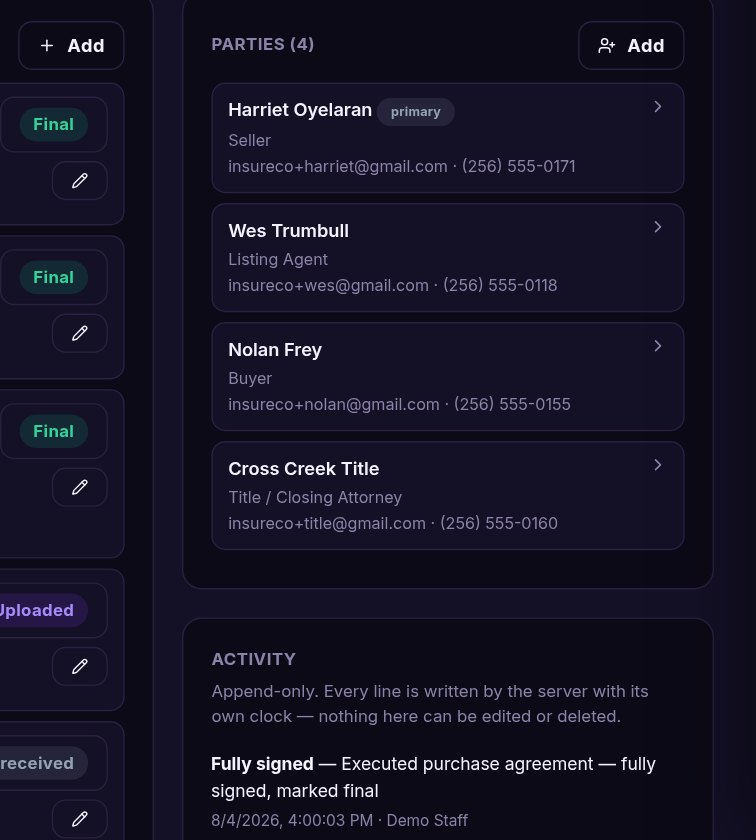
Buyer, seller, both agents, lender, title, inspector — one roster, and the only list a signature request is ever addressed from.
The list is already written
A new room starts with the documents that deal type requires and marks which are non-negotiable, so nothing is remembered late.
Sent from the room itself
Any document goes out in one step, to the parties already on the roster, and comes back signed with a certificate of completion.
Deadlines that count themselves
Template tasks arrive dated from the day the room opened, and the pipeline shows what is past due across every open deal.
What a room is built to stop
None of these are dramatic. All of them cost a closing date, a commission, or a client:
- A required disclosure nobody noticed was never returned
- An inspection or financing deadline that quietly passed
- Three versions of the contract and no certainty which was signed
- Earnest money delivered but never receipted
- A signature request sent to the wrong party or the wrong address
- A closing file that cannot be reconstructed six months later
- A teammate covering the deal who has no idea where it stands
- Client documents sitting in a personal inbox or a shared drive link
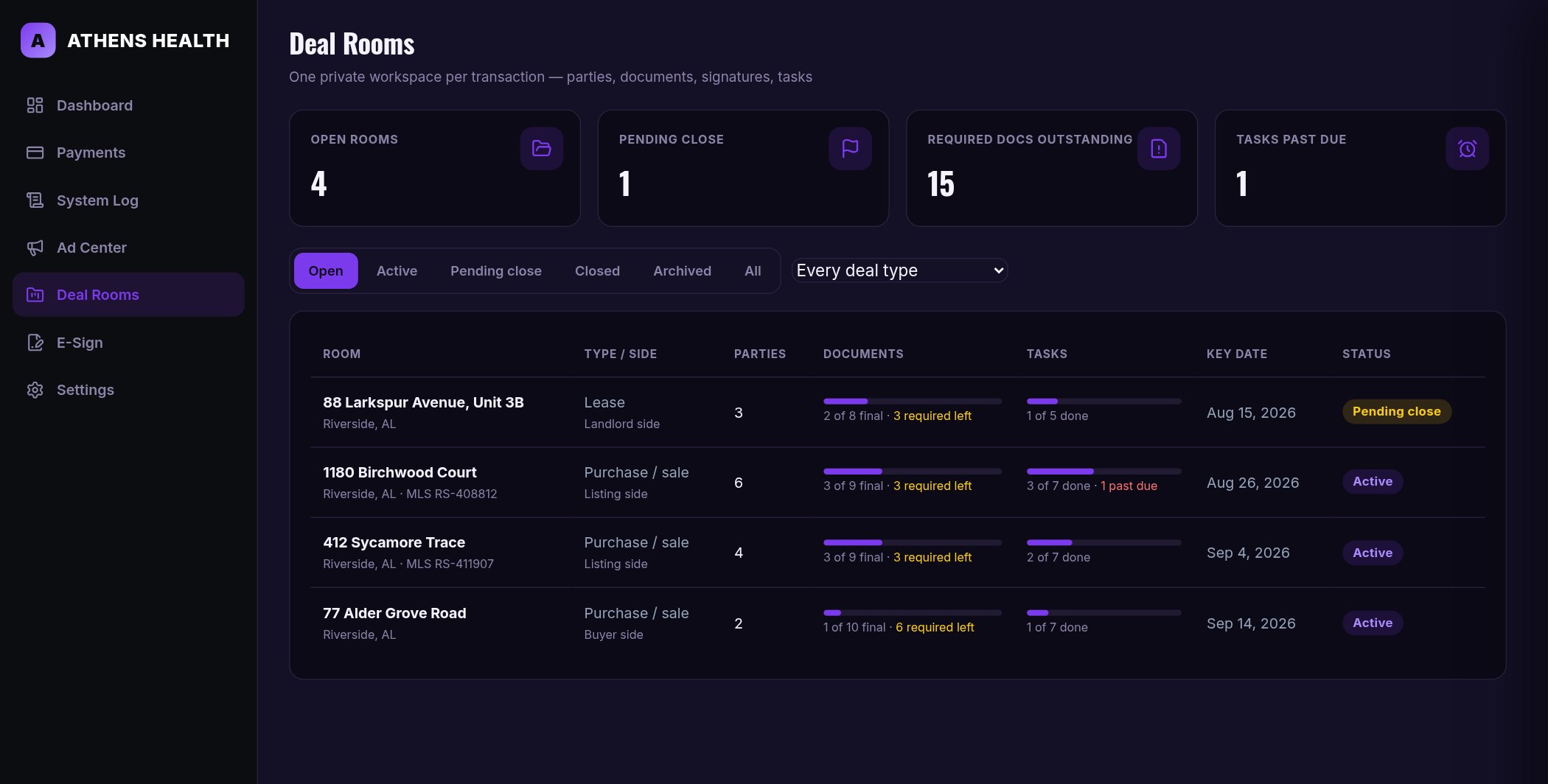
Every live deal on one board.
Documents finished, tasks done, required items still outstanding and anything past due — counted for you, per room, sorted by the date that matters next.
- Filter by status: open, active, pending close, closed, archived
- Filter by deal type — purchase, lease, land, commercial, new construction
- Progress bars from the real document and task state, not a guess
- Required-documents-outstanding and past-due counts across the whole board
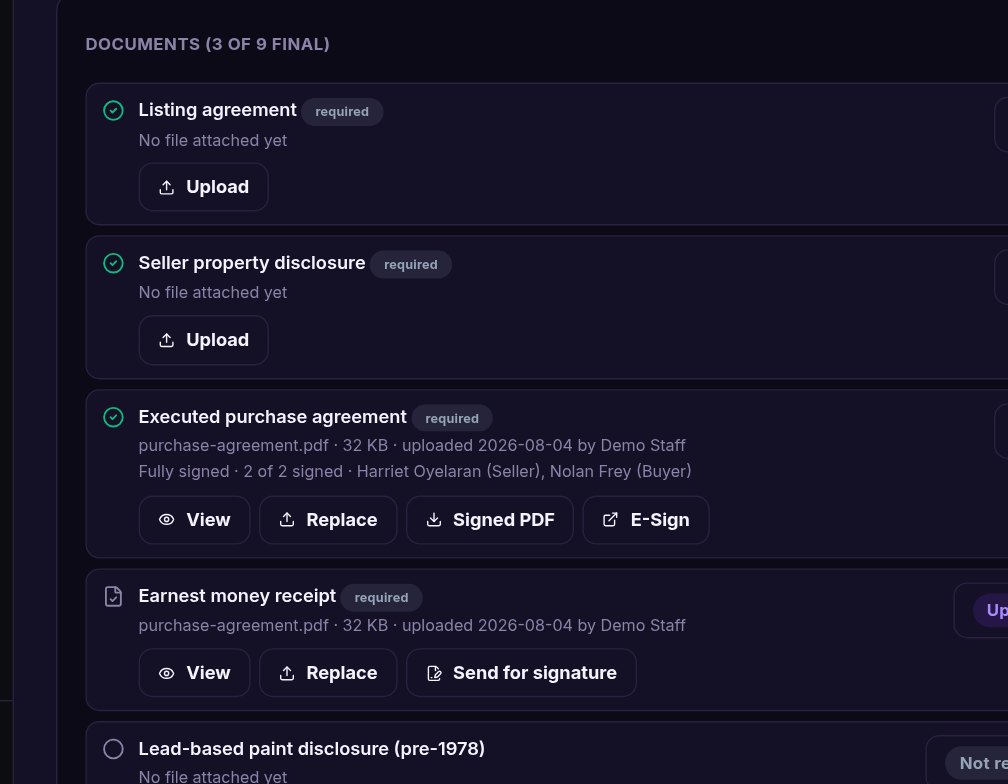
The list writes itself; you just fill it.
A room opened from a template already lists what that deal type requires. Each line moves from not received to uploaded to out for review to final, and the room tells you how many required lines are still open.
- Upload a PDF or a phone photo of a scan — up to 12 MB per document
- Files are stored outside the website; no URL reaches them
- The server verifies what a file actually is, not what it is named
- Send any document for signature straight from its line
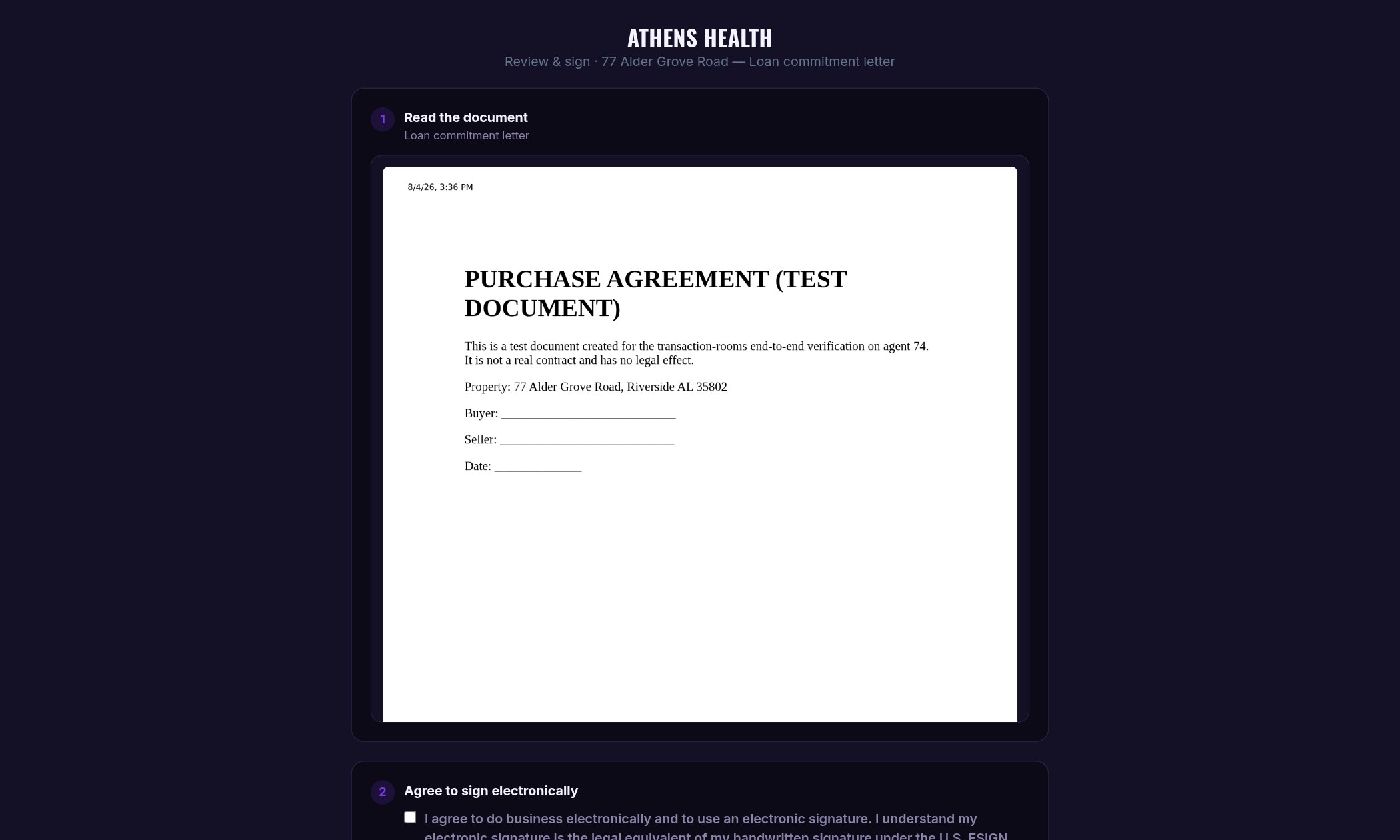
Signed by the people already in the room.
Tick who signs, set the order if it matters, send. Each signer opens their own private link, reads the document, agrees to sign electronically and draws a signature — on a phone, with no account and no app to install.
- Included in the platform price — no per-envelope, no per-signature fee
- Signing order is enforced: a later signer waits their turn
- Every view, consent, signature and decline is timestamped with an IP address
- The signed PDF ends with a certificate of completion and the document's hash
- When the last signer finishes, the document marks itself final in the room
A file that answers for itself.
Every party added, document moved, signature sent and task completed is written to the room's activity feed by the server — with the server's clock and the name of whoever did it. It is append-only: there is no edit and no delete, for anyone, through any interface.
- A document that went out for signature can no longer be deleted
- Rooms are staff-only — no other login on the account can read a party's details
- A closed or archived room refuses new documents and tasks at the server
- Six months later the room still shows exactly how the deal was run
The same seven steps, every time.
Whether it is a $200,000 starter home or a twelve-month lease. The room is what makes them the same.
Open the room
Pick the deal type. The checklist, the roles and the task dates come with it.
Add the parties
Everyone who touches the deal, each with the role they act in and the address a signature goes to.
Collect the documents
Upload as they arrive. Required lines still outstanding are counted for you, on the room and across the pipeline.
Send for signature
Tick who signs, set the order if it matters, send. Each signer gets their own link.
Watch it come back
When the last signer finishes, the document marks itself final and the signed PDF is in the room.
Clear the deadlines
Inspection, appraisal, financing, walk-through. Tick them off; the record keeps the dates.
Close the room
A closed room stops taking new work but keeps everything it holds — the file, and the story of how it got there.
Not just the rooms.
How the private parts are actually handled.
Documents are never web-served
Uploads live in a private directory beside the site, not inside it. There is no public URL to a contract and nothing for a crawler to find.
Type-checked on the way in
The server reads the file's magic bytes and rejects anything that is not really a PDF or an image — renaming a file does not get it in.
Staff-only by default
No non-staff session can read any room record. Party names, emails and phone numbers stay inside the office, whatever else runs on the account.
Append-only history
The activity record is written only by the server. The data API refuses every attempt to change or remove a line of it.
Signatures carry their proof
Consent time, signing time, IP address, signer role and the document's SHA-256 hash are printed on the certificate attached to the signed PDF.
Isolated per business
Your rooms live in your own database, on encrypted off-site backups, behind TLS on every page.
AI document review.
A second pair of eyes reads a contract as it lands in the room and flags what a careful coordinator would catch: a missing initial, a date that contradicts the deadline schedule, a blank that never got filled. It reads only — it never accepts, verifies or approves anything, and the broker remains the reviewer. It is a separate add-on that runs on your own AI provider key, so it is not part of the price below; ask to have it switched on.
$79.95/year. Unlimited rooms.
No per-transaction fee, no per-seat fee, and no per-signature fee — the thing most transaction software charges for every time you use it.
- Unlimited deal rooms and unlimited parties
- E-signature included, with certificates of completion
- Private document storage and the append-only record
- Your public website, your subdomain and TLS
- Self-serve setup — no approval queue, no sales call
Frequently asked
Is e-signature really included?
Yes. Sending a document for signature is part of the platform price — there is no per-envelope and no per-signature charge. Signers need no account: they open a private link, consent, sign and are done.
Can I place signature boxes on the page?
Yes, with the Field Designer add-on: signature, initials, date-signed, text and checkbox boxes are dropped exactly where they belong on the document and each one is assigned to a signing role. Without it, documents are still sent and signed — the signature is captured in the ceremony and attached with the certificate.
Who can see the documents?
Only signed-in staff, plus the individual signer of a document you sent them — and only through their own private link. Files are stored outside the website, so there is no address anyone else can reach.
Can I change the templates?
Yes. Three ship ready to use — residential purchase on the listing side, residential purchase on the buyer side, and a residential lease. Edit their roles, documents and task dates, or write your own for how your office works.
What happens when a deal dies?
Set the room to closed or archived. It stops taking new documents and tasks — enforced on the server, not just hidden in the page — and keeps everything it holds, including the record of what happened.
How fast can I get started?
Minutes. Sign-up is self-serve. Choose Transaction Rooms during setup and your workspace, e-signature, public site and subdomain are provisioned automatically, with the three starter templates ready to use.
Give the next deal a room of its own.
Open it at contract, work it in one place, and close it with a file that still makes sense a year from now.